

Using this website
Admin

Recording Video

A great feature that we have recently added is the ability to record a video into your post directly from your webcam or mobile device - and it's really easy!

All you need to do is click on the red icon on the right hand side of the toolbar when you are writing your post.
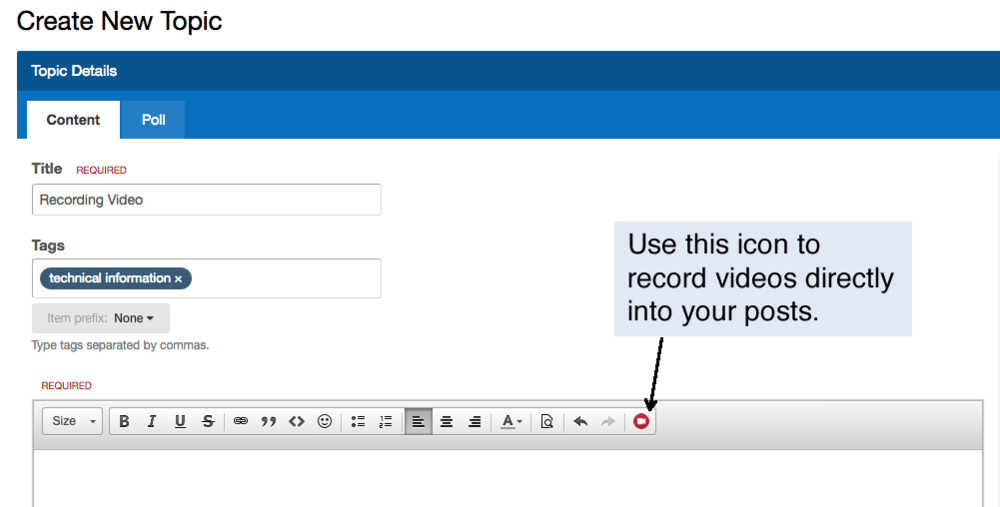

 

videos.png

8 replies

Admin

Hello @Lesley Silvester - thanks for letting us know that you couldn't get this working.

We ran a security update to the server yesterday morning and it ended up blocking the connection for video recording (oops!).  We have updated the firewall settings now and you should be able to get it working.  Sorry about that.

If you still have difficulty with it please let me know.

Edited 9 years ago

Thanks, Simon. I had two goes at recording my name sign and both recorded but the screen is just back. I can hear background noises though. It must be me because I'm not very techno savvy.

Me just figuring it all out :) -There is a waiting period so far. I get a notification that my video will be ready within two minutes so I suppose I shouldn't submit my post before then. --Need Adobe Flash Player (at least on my computer). 
Edit: The resolution is a bit scratchy. So far, So good! Much more efficient than me recording a video, processing through iMovies, uploading to photo library, uploading to youtube, THEN posting the link here. Phew!

Edited 9 years ago
Admin

Hello @KaleLing  - I'll take a look at the server too to see if we can tweak the settings to improve the quality a little.

You do not need to wait when you see the '2 minute' notice - you can still submit your post and the video will appear there once it has been processed.

Admin

Hello @Lesley Silvester - it appears that your webcam doesn't support the frame rate of recording (the number of still images it takes per second) that we were using by default.  I have reduced this to a more standard setting and I think that may solve the issue that you had - let me know if you get a chance to try it again.

- EDIT: Further investigation suggests that this isn't the case -the frame rate was already correct.  Did you plug your webcam in after you had opened the recording window?  The video recorder couldn't see your webcam so it could be that if you plugged it in just before recording this was too late.

Edited 9 years ago
Admin

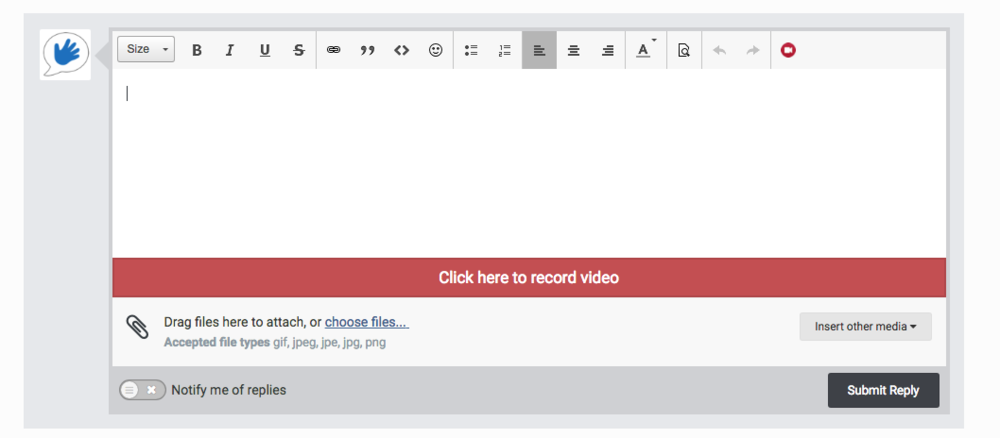
Over the past few days we have upgraded the video recording software used on this site.  Video recording should now be a smooth process and can be used on desktop and mobile devices.  To record a video in a post just press the red button below the text input box when you are creating a topic or replying to a post.

videorecording.png

Reply

Sign in to reply. You can write, record yourself signing, or both.

More in Using this website

Report this post

Sign in to report a post, so a moderator can tell you what happened.

If you don't have an account, use the contact form and include the link to the post.

Sign in